- The good thing about this podcast is that the particpants know what they are talking about and bring up points I had not heard before. Almost everyone I know is planning to vote in favour of MMP, so it was good to hear cogent contrary views.
- The bad thing is that there is a lot of discussion about MMP and it's implications for democracy in Ontario. It is pretty nerdy.
- The worse thing is that I rewound about six times while listening to make sure I understood what the speakers were saying.
Thursday, October 4, 2007
Proportional Rep. in Ontario: The Podcast
TVO's Big Ideas has this audio of a panel discussion on the Ontario referendum on changing the electoral system to proportional representation (called MMP).

Wednesday, October 3, 2007
Licensed to score

I am pretty happy with my latest purchase. Some intimidating dart flights for the next tourney. I don't think anybody will mess with me when they see the logo for the IPOA. If you don't know, the sleeping lion represents the trade organization for mercenary companies. Oops, I mean the peace operations industry.
A steal at £10.
Illegal substitution
This screen shot is from the Rogers Sportsnet coverage of a match between Canada and Costa Rica in June 2007. Early in the second half Costa Rica decided to change strategies. For the first 50 minutes they were content to play a containment game. At this point the coach decided to go for regime change and pulled President Bush Sr. out of the game, in favour of more shooting prowess.
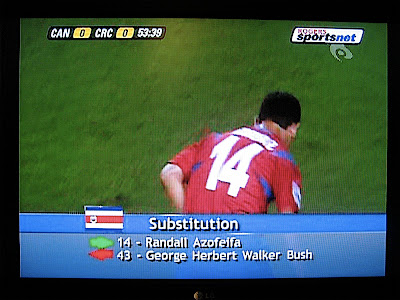
As every footie fan knows Bush wears 43 in honour of his son, the 43rd President of the United States. Or perhaps he lost a bet and is forced to wear it.
As every footie fan knows Bush wears 43 in honour of his son, the 43rd President of the United States. Or perhaps he lost a bet and is forced to wear it.
Monday, October 1, 2007
Birth Announcement
David Meslin writes:
Working with other groups such as the Toronto Coalition for Active Transportation (TCAT), Advocacy for Respect for Cyclists (ARC), iBikeTO, Toronto Bicycle Network and many others, the Cyclists Union will build our community into a strong, diverse, fun and effective network of thousands of bike riders fighting for change.
To get updates on the development of the Cyclists Union over these nine months and to find out how to get involved you can:
1) Subscribe to monthly updates.
2) Join our facebook group.

Unbreakable Links in Mail.app
Your GMail friends hate the links in your email messages because they appear to be broken. It isn't your fault. It is just that you use Apple Mail. Many simple fixes for this behaviour have been proposed, such as surrounding your link with "< >". Only a few actually work. In future other email readers will handle links the way Apple does, or perhaps Apple will add a preference setting to let users opt for old-fashioned handling of text. In the meantime, Apple Mail users can do this:
1. Use Rich Text as your setting for composing mail.
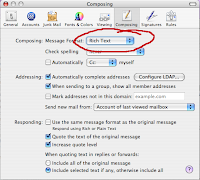
2. Copy your URL link.
3. Type a short phrase describing the location.
4. Select the phrase and right click it (Control-Click) to get the contextual menu. You can also use "Add Hyperlink ..." from the "Edit" menu.
5. Select "Edit Link..." and paste your URL.
Thanks to Hawk Wings for the analysis and solution.
1. Use Rich Text as your setting for composing mail.

2. Copy your URL link.
3. Type a short phrase describing the location.
4. Select the phrase and right click it (Control-Click) to get the contextual menu. You can also use "Add Hyperlink ..." from the "Edit" menu.
5. Select "Edit Link..." and paste your URL.
Thanks to Hawk Wings for the analysis and solution.
Thursday, September 27, 2007
Scoring play
This is a slide show in which the slides are individual bars from the score and the accompanying music is ... well, you get it. The fun thing is that it will play on a Nano iPod. So now you don't have to carry a box of sheet music around with you when you want to follow along. It's okay for piano, but for orchestral works you will want a larger screen.
Wednesday, September 12, 2007
Manual upload to picasaweb
Picasaweb is a great service, but its uploading tools require MacOSX 10.4. I have been coaching my mother to get photos of her paintings on her picasaweb site. She runs MacOSX 10.3 on her G4 laptop. There is no documentation on manual uploading of photos to picasaweb from iPhoto.
Here is a procedure for exporting an album of photos from iPhoto. It is not very fun, but it should work for everyone.
1. In iPhoto create an album of photos you want to have on your Picasa web site
2. select the album and do File>Export ... from the menu.
3. select "File Export" from the tabs in the dialog that appears
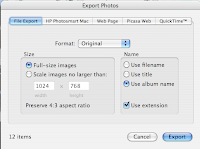
4. create a new Folder to hold the exported photos. (I like to put it on the Desktop in a folder named after the album name). Select "Desktop" and click the "New Folder" button. When you are done, go ahead and export the photos.
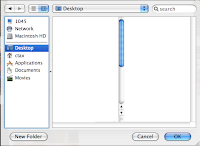
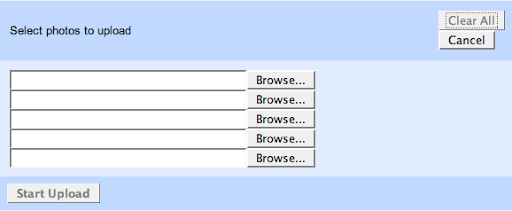
5. In Safari, go to your picasaweb account and log in. Create a new album and name it. The other options can be edited later. Click the "Upload Photos" button. The file upload form allows you to upload 5 files at a time. Tedious. Click one of the Browse buttons, and a file selector window will open. Find your new album folder on your Desktop, and select a photo file in it. Repeat with four more if you want. Click "Start Upload".
This will take a while to save. When it is done you should be redirected to your new album with uploaded photos displayed in thumbnail. You can upload more photos to an existing album. There is a link to do so on the left hand side.
Here is a procedure for exporting an album of photos from iPhoto. It is not very fun, but it should work for everyone.
1. In iPhoto create an album of photos you want to have on your Picasa web site
2. select the album and do File>Export ... from the menu.
3. select "File Export" from the tabs in the dialog that appears

4. create a new Folder to hold the exported photos. (I like to put it on the Desktop in a folder named after the album name). Select "Desktop" and click the "New Folder" button. When you are done, go ahead and export the photos.

5. In Safari, go to your picasaweb account and log in. Create a new album and name it. The other options can be edited later. Click the "Upload Photos" button. The file upload form allows you to upload 5 files at a time. Tedious. Click one of the Browse buttons, and a file selector window will open. Find your new album folder on your Desktop, and select a photo file in it. Repeat with four more if you want. Click "Start Upload".
This will take a while to save. When it is done you should be redirected to your new album with uploaded photos displayed in thumbnail. You can upload more photos to an existing album. There is a link to do so on the left hand side.
Subscribe to:
Posts (Atom)